18.11.2026 · 6 min read
Constraining agents through the codebase: one way to do each thing
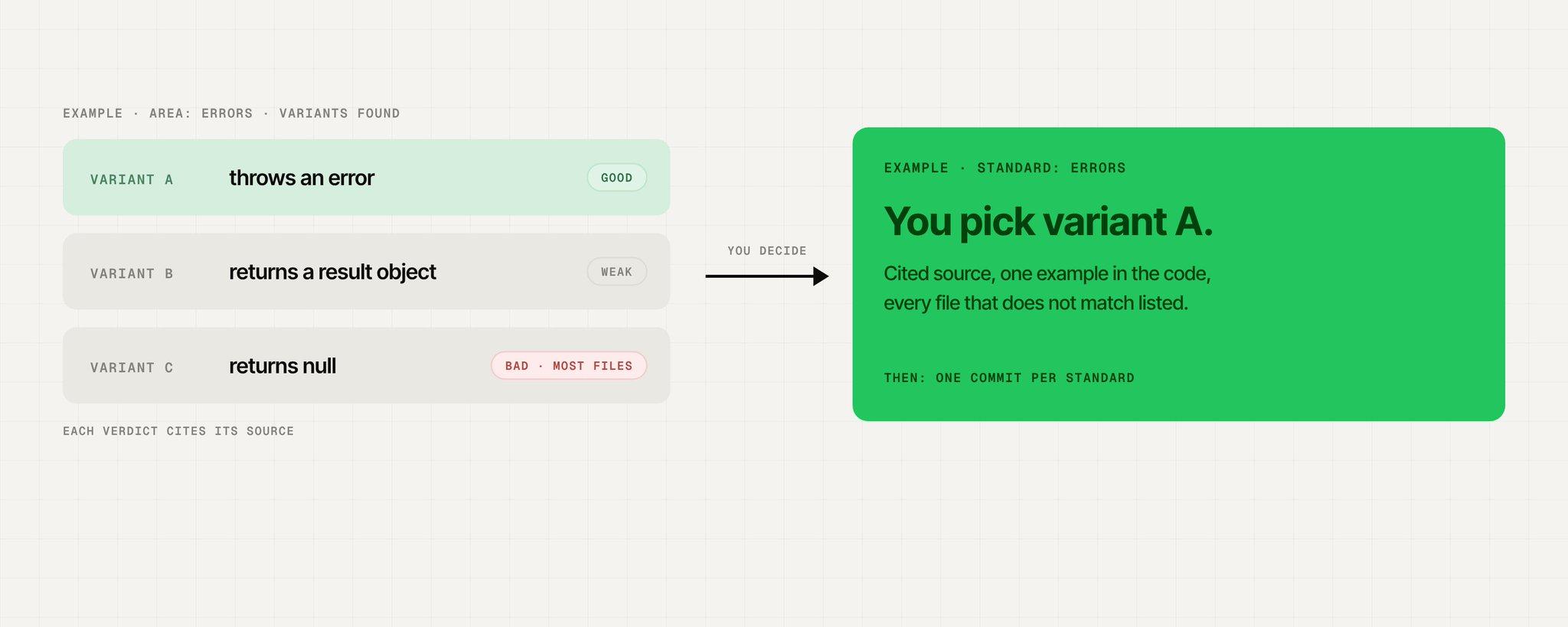
When I work with agents, my code is my documentation. An agent learns how a repo works by reading it, so it follows the patterns it finds there, good or bad.
So a bad pattern spreads. The agent reuses it in the next feature, and soon it is all over the code. Then you are stuck rewriting it or re-prompting every session.
align-code is a skill in my nstack skill repo that tries to stop this. It finds every place the code does one thing in more than one way, lets you pick one way and rewrites the code to match. It is experimental and I am still improving it, but it already helps a lot.
What it does
align-code looks at your code and finds the places where it does the same thing in different ways. Think of error handling done three ways, or auth checks done two ways. Each of those topics is one area.
First it makes a list of these areas and shows it to you. You decide which ones matter, so it never works on things you don't care about. A starting checklist (naming, errors, auth checks, tests and more) helps it look, but it only keeps what really shows up in your code.
Then, for each area you keep, it finds every variant, counts how many files use it and says whether it is good, weak or bad. Every verdict comes with a source, such as the official guide for the language or framework. When it can't find a source, it doesn't guess. It marks the variant as something to research first.
Two rules hold throughout:
- The majority does not win. An anti-pattern is bad even when it is everywhere.
- No standard may change a public API, a schema, a config name or the UI, and none may change behavior except to fix a hang, a crash or a silent failure.
When to reach for it
- Use it when the code does the same thing in several ways and agents keep following the wrong one.
- Skip it when the code already does each thing one way.
How to use it
Say "align the code" in your agent, or use one of these commands. Each run gets a name you pick, so you can stop and pick it up later.
| Command | What happens |
|---|---|
/align-code new <name> | Start a run: agree what code to look at, list the areas, and after you approve the list, check each area you keep |
/align-code <name> | Answer the next open question, one per session |
/align-code <name> report | Check that every area you kept is consistent or has its standards decided, and write the report if the checks pass |
/align-code <name> apply [area] | Rewrite the code to one standard per session |
/align-code | List earlier runs, newest first |
Everything a run finds and decides is saved as plain markdown in docs/align/<date>-<name>/, so you can read it and an agent can pick it up in a new session.
How it works
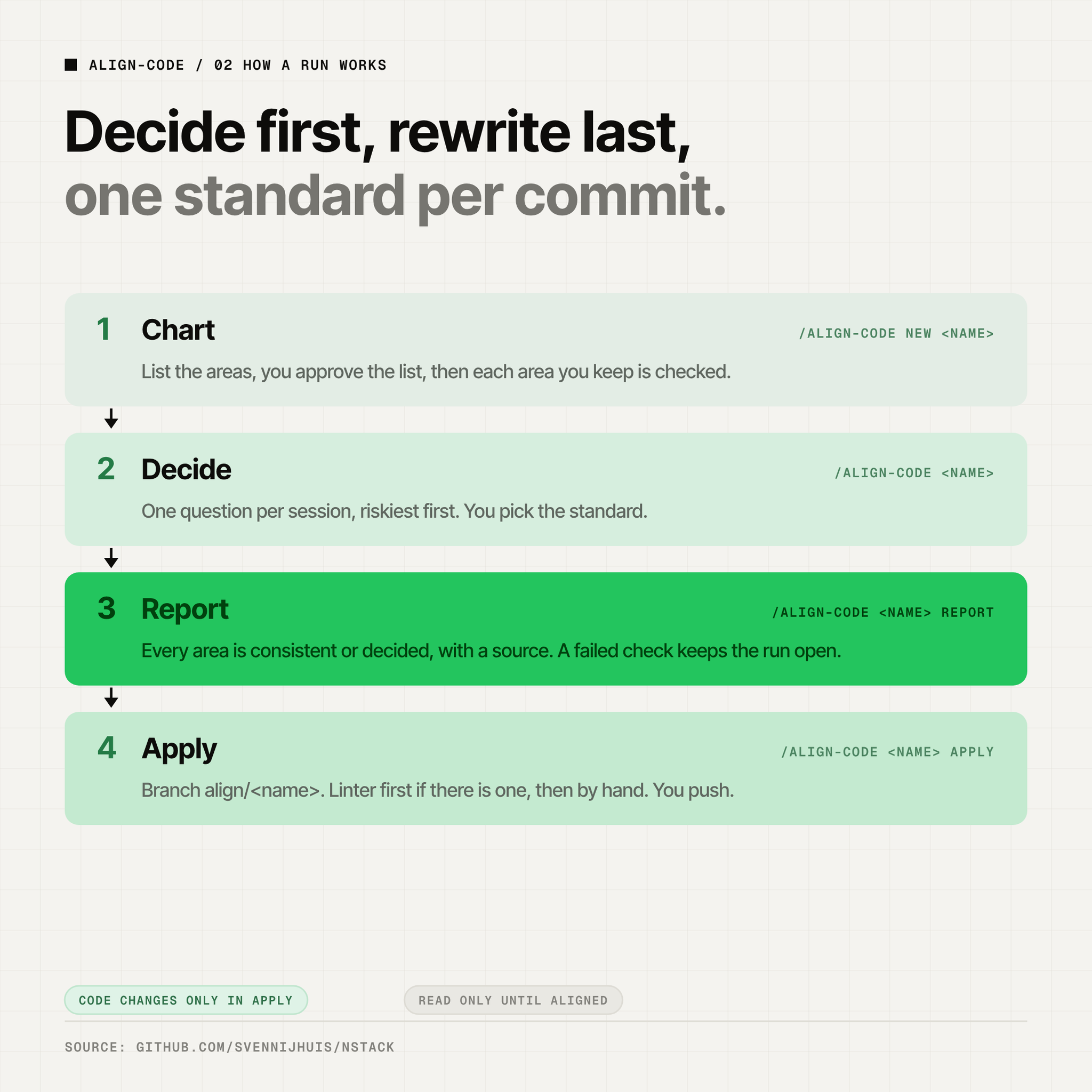
A run has four steps, and your code does not change until the last one.
Chart. The skill lists the areas it found, like naming or error handling. You add or drop areas and approve the list. Then it checks each area you keep: which variants exist and how good each one is.
Decide. You answer one open question per session, the riskiest first. You pick a variant or write your own standard.
Report. The skill checks that every area you kept is consistent or has its standards decided, that every standard has a source and an example in the code when one exists, and that no two standards clash. If a check fails, the run stays open. A question you don't want to decide becomes a risk you own.
Apply. After you approve the file list and any linter rule, the skill rewrites the code to the standards, linter first and then by hand. The code for each standard lands in one commit on a local branch, align/<name>. You review and push.
That is where the skill stops. My own habit: when the code is aligned, I delete the run folder and squash-merge the branch, so the run docs never reach main. The aligned code is the documentation now, and that is what the next agent reads.
Linting keeps it aligned
A standard in a report is still a doc. A lint rule is checked every time the linter runs, so the next agent is more likely to hit an error than to follow the old pattern.
So once you decide on a standard, apply adds a rule for it, or updates an existing one, when the repo already has a linter that can enforce it. The linter fixes what it safely can, and the rest is fixed by hand. The skill never adds a linter or a plugin, so without one everything is fixed by hand. I prefer the linting way.
Many standards can't be a lint rule, like where a check belongs or how a module is split. For those, the aligned code and its example file carry the standard. To write one down too, add a line to docs/agents/code-standards.md, which /setup-agents-md maintains and align-code reads as a candidate in the next run.
It's working if
- Every question shows the variants, how many files use each one and a recommendation with a source, or a note that it needs research first.
- The agent stops and waits for your answer on every question.
- The report names the standard or standards for each area that needs one, an example in the code for each, and the files that still need to change.
- The code for each standard lands as its own commit on
align/<name>, with build and tests passing, and lint too when the repo has one. Comment fixes go through/comment-root-cause, not that branch.
Install
Clone nstack and copy the contents of skills/ into your agent's skills folder, for example cp -R nstack/skills/* ~/.claude/skills/ for Claude Code or ~/.cursor/skills/ for Cursor. Create the folder first if it does not exist. Codex and GitHub Copilot work too. Then say "set up nstack" to pull in the external skills.
My next article will likely cover comment-root-cause, the skill that asks why a comment is there and fixes the root cause when it covers a shortcut.